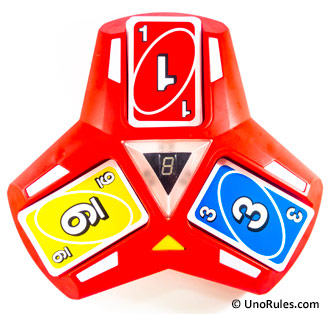
 Uno Triple Play is one of those versions of Uno that once you start playing it, you can’t really stop. It’s enjoyable in that the provided electronic machine unit introduces unpredictability and randomness to every Uno game. It doesn’t shoot cards, or spit them out; it merely uses lights to further randomize and make the game exciting. Coupled with some new Action cards, this is a neat Uno variant that you ought to have in your collection if you enjoy playing Uno. Here we’ll explain all the Uno Triple Play rules, so read on!
The Triple Play Unit
The game comes with 112 cards and the electronic Uno Triple Play unit. As always, the winner is the one who gets rid of all the cards in their hand ahead of the others. 2-6 players may take part in a game. Let’s look at the Triple Play unit first. If you look at the bottom, there are two card storage compartments thoughtfully provided and a battery bay for 3 AA batteries.
There are also two switches. One of them is for the Timer mode which we’ll explain later, and the other is the On/Off/Try Me switch. The Try Me option is just so that the unit can play its sounds and lighting for display purposes (e.g. in a toy store), and not meant for playing any game (the lights turn off after a few seconds). To play a proper game, simply turn the switch to On. This switch works also for any new game; turn off the unit and turn it back on to reset everything and start a new game.
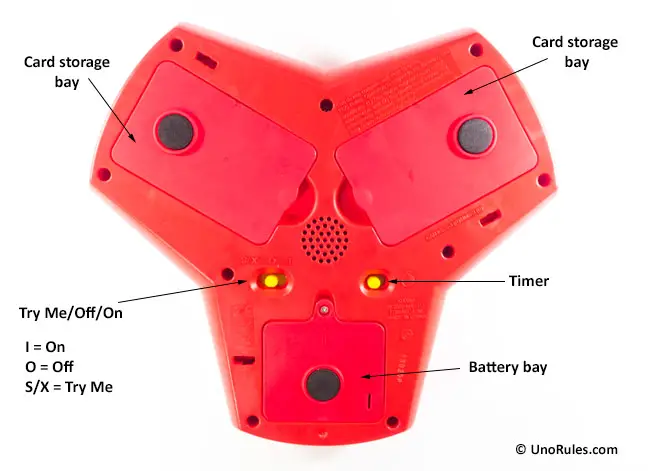
Bottom view for the Uno Triple Play unit.
Lastly, there is a yellow Go button on the top of the unit to start a new game. This button also adjusts the volume of the sounds. To adjust the volume, press and hold down the Go button for a few seconds until you see a number appear on the Center Display. Release it and press it again to adjust the volume from 1 to 5 (high).
Gameplay for Regular mode
There are two ways to play the game, Regular or Timer mode. We’ll look into the Regular mode first. To start the game, appoint a dealer who shuffles the cards and deals out 7 cards to each player.
Turn the Triple Play unit to On, and place the remaining deck face down beside the unit. This will be the Draw pile. Take out 3 numbered cards (put back any Action cards) from the Draw pile, and place them face up on the 3 open decks on the Triple Play unit. These are the 3 Discard piles, but you can only play to the piles that are lit up by the lights flashing beside them. Sometimes, all three Discard piles will light up; sometimes only one, so you’ll never know what to expect!
Hit the Go button to kick off the game. The first player to the dealer’s left starts the game by playing a card that matches by color, number, or symbol onto any one of the Discard pile cards. You can only play one card at each turn, and after playing it, press the pile down like a button. A beep will sound, and the lights will then rotate around the Discard piles to a random one for the next player.
If you don’t have a matching card or simply choose not to play one, you must draw a new card from the Draw pile and press any of the Discard piles to rotate the lights for the next player after you.
Overloading
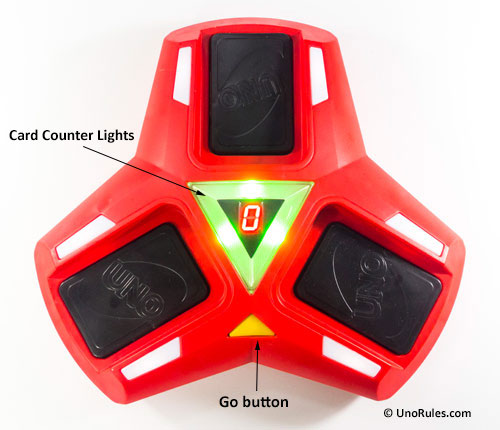
At the start of the game, all the Discard pile decks are showing green lighting.
At the start, all the Discard pile decks are lit up as Green on the central Card Counter Lights. The moment one is played onto, it turns Yellow, which is the warning light. Once a Discard pile is played onto for too many times, it becomes in danger of Overloading, and turns Red in color which is the danger signal. The Red will persist until suddenly it gives way, and the “overloaded” tone will sound, while a random number flashes in the Center Display.
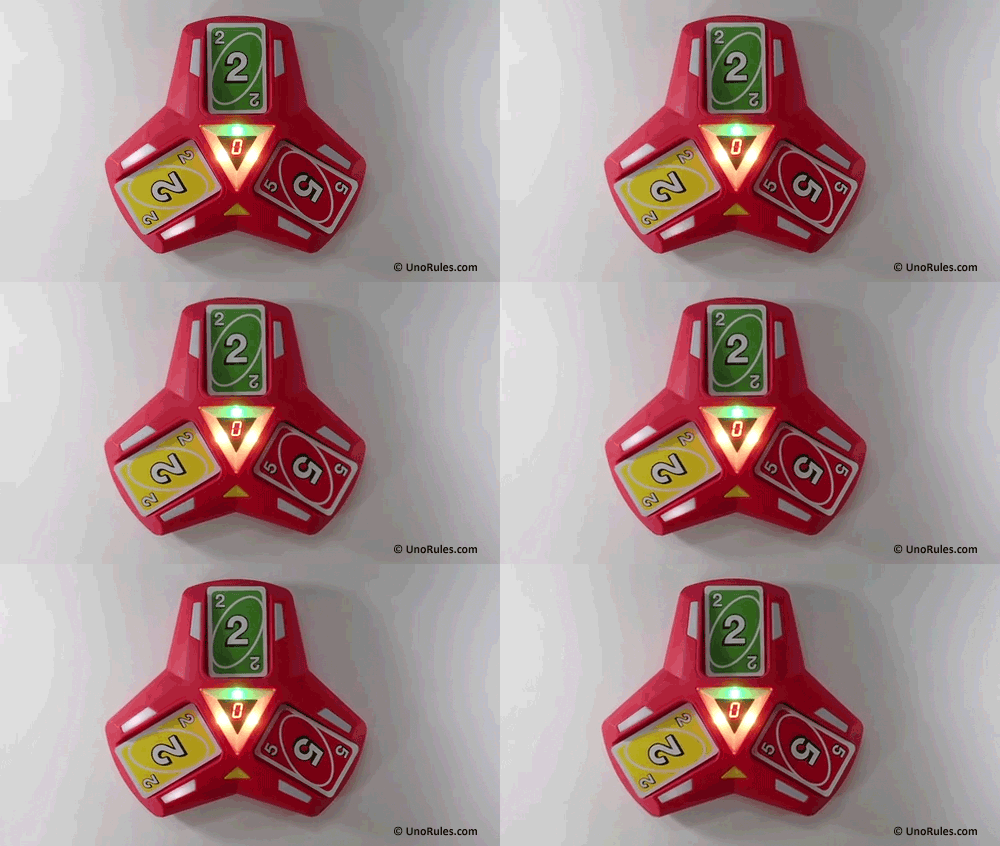
Here, two Discard pile decks have turned yellow. Note the flashing lights indicating the Discard pile to play to, which in this case is the one with the yellow number 2 card.
The unfortunate player who caused the overload must then draw the number of cards as shown in the Center Display, and then press the Go button to continue play for the next player after them. Note that you do not press down on the Discard pile decks at this point, but rather the Go button.
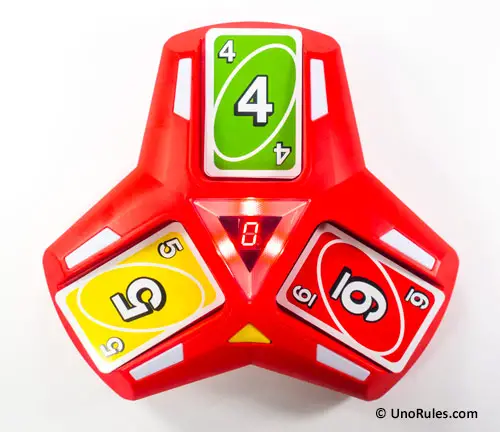
When all the Discard pile decks are showing red, that’s the maximum danger level. Any Discard pile can become Overloaded at any moment!
Why is this Overload so dreaded? You could be down to your last card, but if you played it onto a Discard pile that overloads, you can’t win the game and must draw the required number of cards and continue playing on!
Winning the game
As usual for all Uno games, when you are left with one card in your hand, you have to announce “Uno” aloud to the other players. Failure to do so doesn’t automatically mean a penalty, but if someone notices and catches you before the next player has begun their turn, then you will need to draw 2 cards from the Draw pile as a penalty.
Once someone “goes out” or plays their last card, they win the game. You can play as many rounds as you wish, and a recommendation from Mattel is to play with a point scoring system. Each player who wins a round gets points from all the cards left in the other player’s hands under a running tally, and the first player to hit the target of 500 points is declared the winner.
The cards are valued as below:
- All numbered cards – Face value
- All regular Action cards (Reverse/Skip/Discard 2 of the Same Color) – 20 points
- All Wild cards (Wild/Wild Clear/Wild Give Away) – 50 points
Timer Mode
For playing the Timer Mode, turn the yellow switch on the unit bottom to On, and press the Go button to start the game. In this mode, each player only has 7 seconds to play a card with the countdown being displayed on the Center Display.
Play a card to any of the lit-up Discard piles and press down on the deck within the 7 seconds before the clock runs out to zero. If the timer expires before you complete your turn, you must draw 6 cards from the Draw pile! Woah.
If you don’t have a suitable card to play, or you choose not to play any card, you must still press down on the lit-up Discard pile decks to stop and reset the timer for the next player after you. And the same penalty applies if you fail to complete your turn by 7 seconds – You must draw 6 cards!
After drawing the 6 penalty cards, press the Go button to continue the game.
The Action Cards
An Action card is a card with a special symbol on it that compels an action from the players when played. These Action cards include the Wild cards that can be played on any lit up Discard pile and here we explain what each one does in Uno Triple Play.
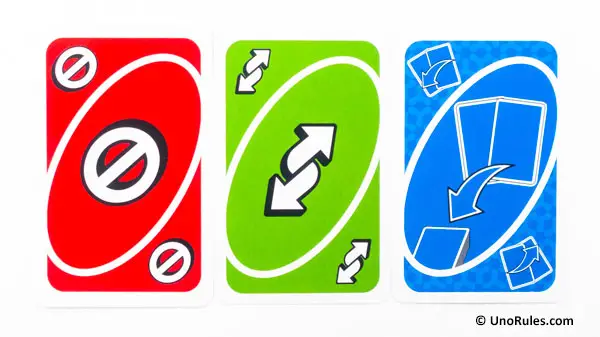
From Left to Right: Skip, Reverse, Discard Two of the Same Color
Reverse – When played, the direction of play is reversed, from clockwise to anti clockwise, and vice versa. If there are only two players playing, it means the person who plays this card gets another turn. It can only be played on another Reverse, or card of the same color.
Skip – When this card is played, the next player simply loses their turn. And if there are only two players playing, this means the person who played it gets another turn. It can only be played on another Skip, or card of the same color.
Discard Two of the Same Color – This card should be played with another card of the same color, enabling you to discard two cards at once. However, it is not necessary to play two cards, and you can also discard it alone. If discarded with another card of the same color, this card needs to be on the bottom and the other card on top, facing up. The other card need not be a numbered card, and can also be another Action card of the same color, like a Skip for example. If the top card is an Action card, the next player must perform the action indicated by it.
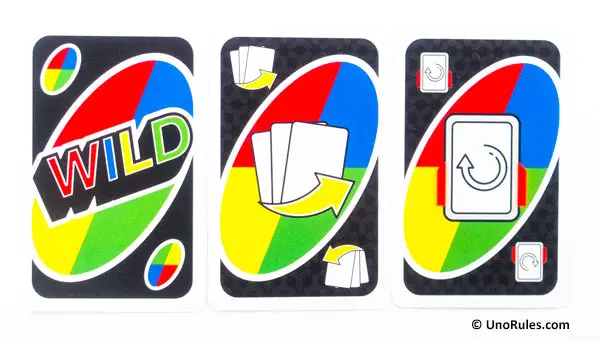
From Left to Right: Wild, Wild Give Away, Wild Clear
Wild card – The Wild cards in Uno Triple Play are a little different from other Uno versions. When played, the player discarding it does not call the color to continue play, but the next player who plays a card to that particular Discard pile is the one who decides what color to continue play. Here it merely functions as an easily discarded card since it can be paired with any color.
Wild Clear card – When this card is played, hold down the Discard pile deck for 2 seconds until it resets back to green (from its yellow or red color). The next player who plays a card to that Discard pile will decide what color to continue play by playing a card of their choice.
Wild Give Away card – This Wild card is best played on a Discard pile that is already showing red in the Counter Light, because if it Overloads, you will take the number of cards shown on the Center Display from the Draw pile, and distribute them to the other players anyhow you choose.
For example, if there are 4 players and the Overload display only shows 3 cards, you can choose someone to overlook while giving 3 players the 3 cards each, or you can hand all 3 cards to just one person. But if the Discard pile does not Overload, your turn is over and nothing happens. The next player after you will decide the color to continue play.
Uno Triple Play – Final Thoughts
Uno Triple Play is a fun and well thought out version of Uno. From the way the Triple Play unit was designed in which convenient card storage compartments are given, to the simple operation running on 3 easily available AA batteries, to the gameplay rules that are not too complex or demanding, it is definitely a game worth playing if you’re into Uno.
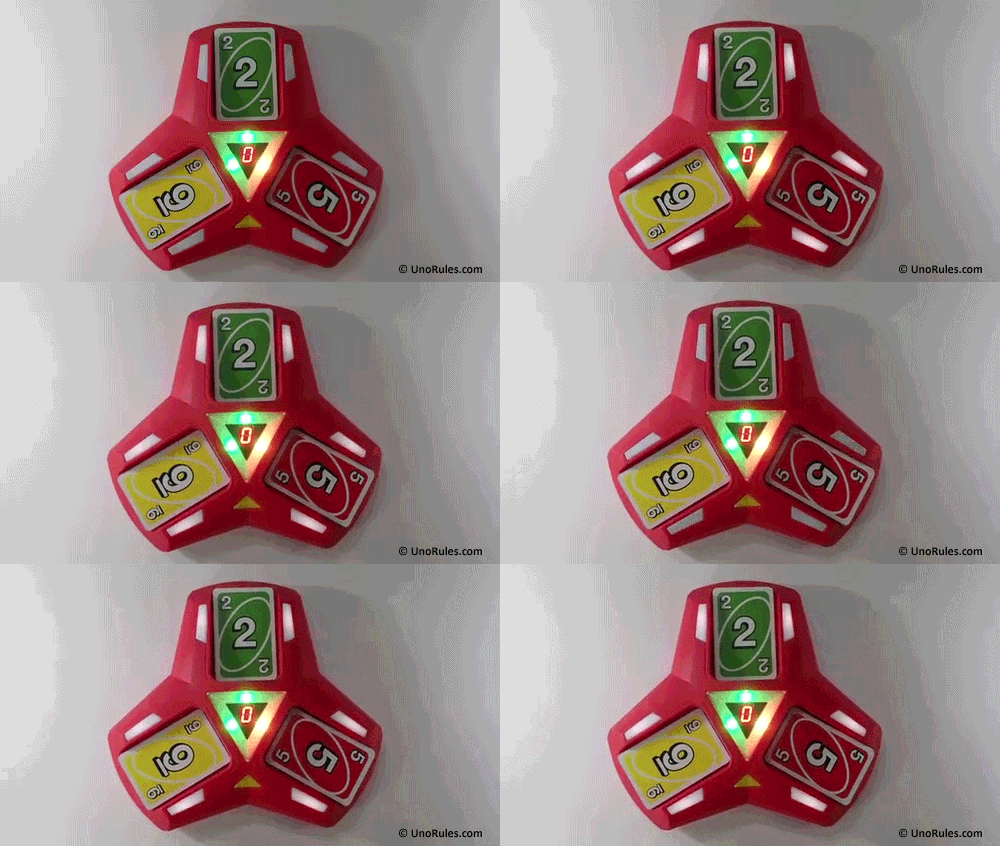
Sometimes, all Discard pile decks will be lit up and you can play to all of them. The lights are a little dim though.
We have a minor gripe about the Discard deck lights though; they are a little too dim. Under bright overhead lighting sometimes it’s hard to make out which deck is flashing its light. There is also a Stealth version of Uno Triple Play released by Mattel, which is mostly the same as the standard version, minus the different Counter Light warnings (meaning an Overload can happen suddenly). It also uses a different color scheme, and has a different Wild card replacing the Wild Giveaway card, called the Wild All Tap card.